Recently, I received a new outdoor security camera from the TP-Link system, Tapo C560WS. It was announced on June 24, 2025. It is quite a bit heavy. I can feel it is a good quality.
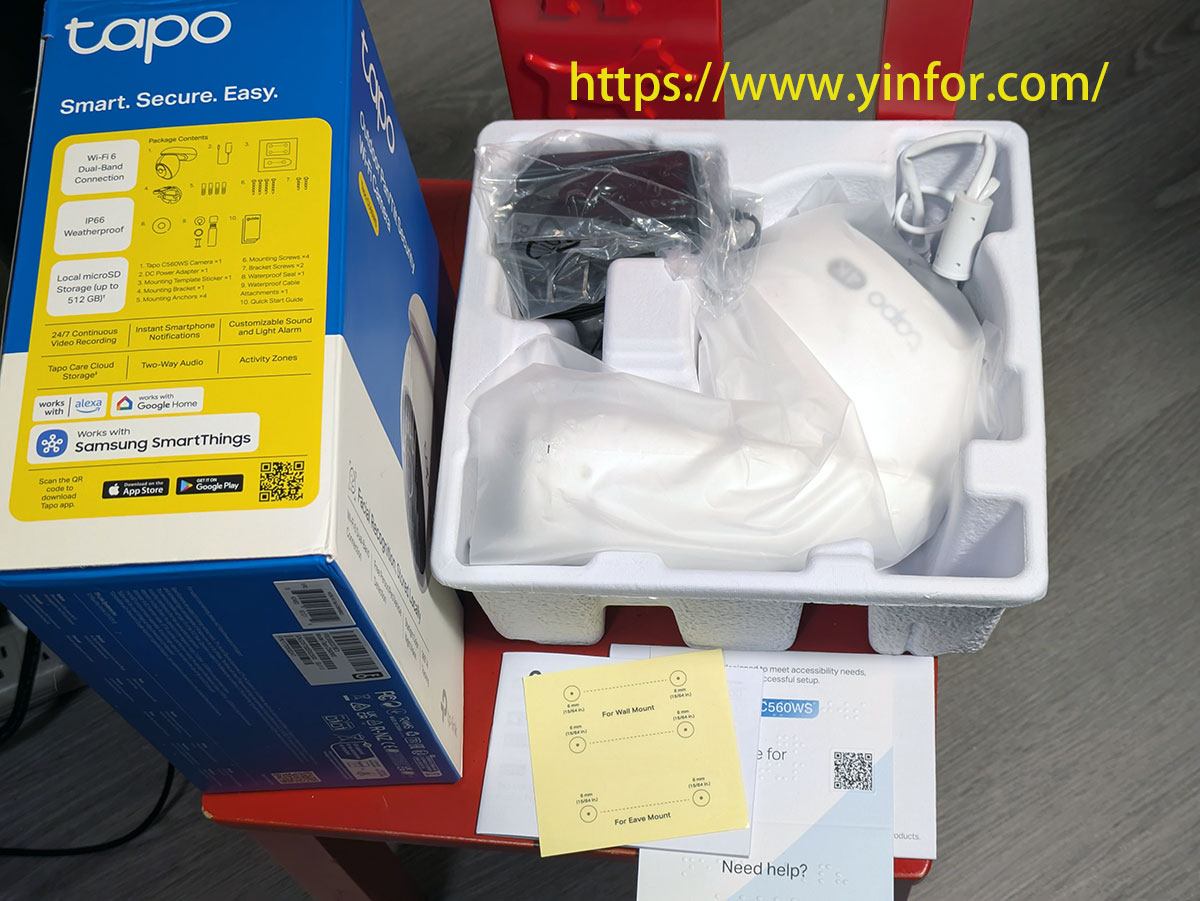
Here is the list of the items.
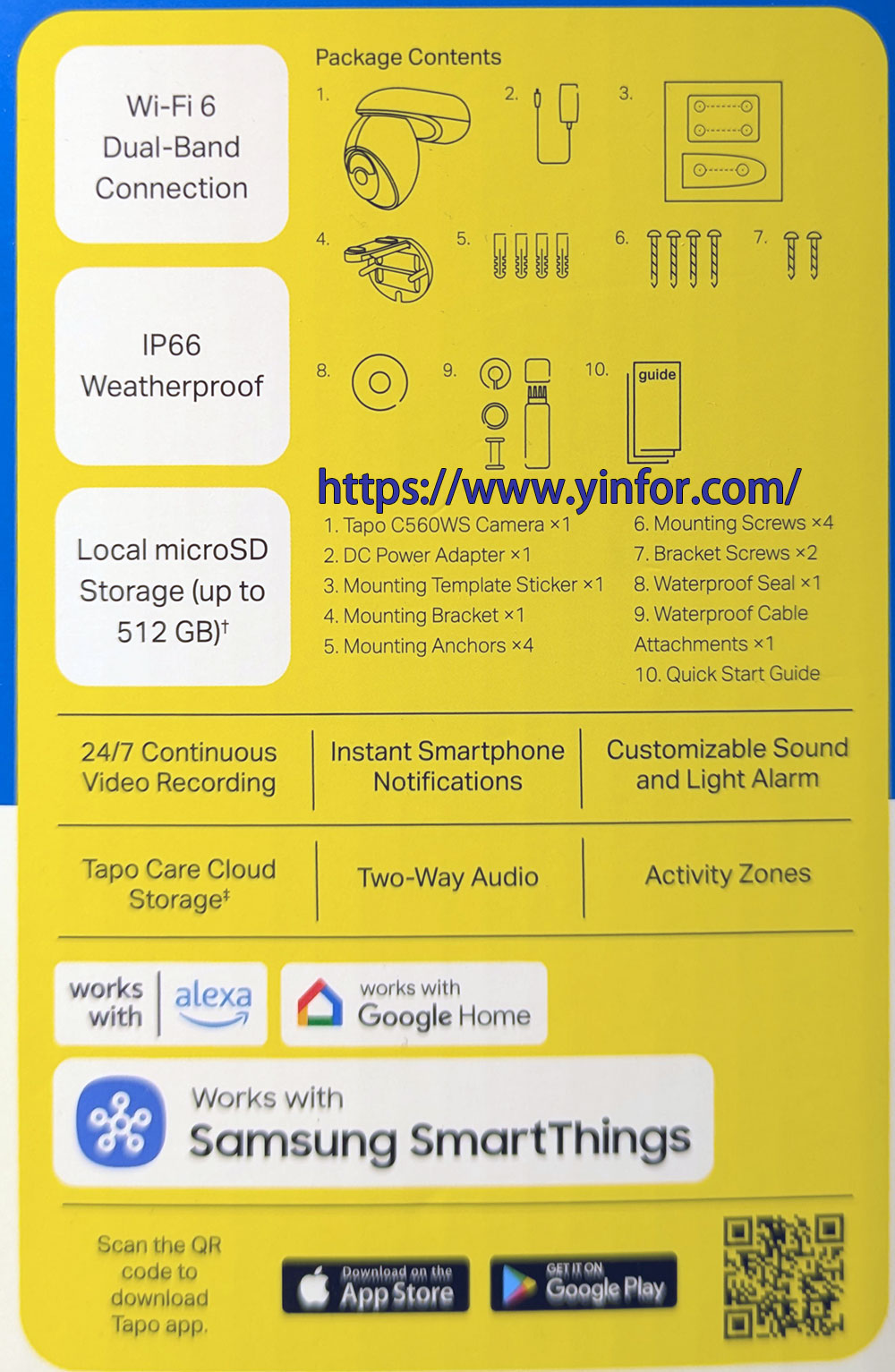
- Tapo C560WS camera
- DC Power adapter 12Vx1A
- Mounting Template Sticker
- Mounting Bracket x1
- Mounting Anchors x4
- Mounting Screws X4
- Bracket Screws x2
- Waterproof Seal x1
- Waterproof Cable Attachment x1
- Quick Start Guide
There is one positive aspect to the package. Each bag of screws includes one extra screw as a spare.
The DC power adapter has a long wire. I can connect it to the wall receptacle, which is somewhat far away.
There is a card inside the box.
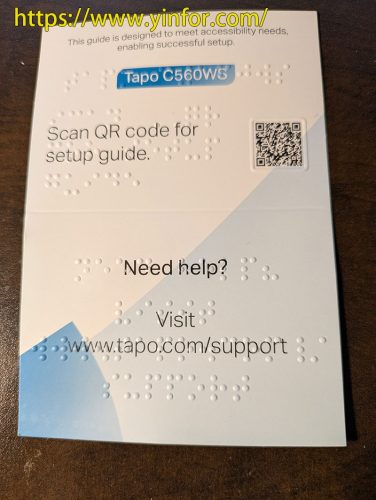
I know these raised dots are Braille, designed for visually impaired people — which is great. However, the QR code currently points to https://www.tp-link.com/us/document/30831/, and that link is unavailable. When I manually change it to https://www.tp-link.com/sg/document/30831/, the setup guide loads correctly. I believe TP-Link needs to fix the issue.
Installation
I installed it on my front door.
Use the receptacle as the center, the length of the power adapter wire as the distance. I find the best spot for the camera.
The wall is a wood panel. So, I don’t need the mounting anchors. Just put the mounting template sticker on the wall, and drill four pilot holes with a 5/64″ drill bit.
Mount the bracket with four mounting screws.
Changed the cable route to the left.
Align and slide the camera base into the bracket.
Use two bracket screws to affix the bracket and camera base.
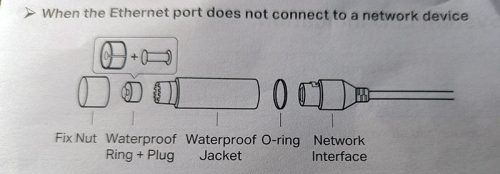
I am not using an Ethernet cable. The waterproof cable attachments can be assembled to fully close the Ethernet interface.
I connected the power connector to the power adapter — there’s a rubber waterproof seal in between.
Anyway, the camera is installed under the carport, so it won’t be exposed to rain.
Features
- 𝟒𝐊 𝐔𝐥𝐭𝐫𝐚 𝐇𝐃 𝐂𝐥𝐚𝐫𝐢𝐭𝐲 – Experience 4× the resolution of standard 1080p with 18x zoom for sharper images and finer details. Capture license plates, small objects, and more.
- 𝐂𝐨𝐦𝐩𝐥𝐞𝐭𝐞 𝐀𝐫𝐞𝐚 𝐂𝐨𝐯𝐞𝐫𝐚𝐠𝐞 – Enjoy 360º horizontal and 98º vertical views with pan/tilt, letting you monitor more space. The camera’s field of view is greater than the mechanical pan/tilt range.
- 𝐅𝐫𝐞𝐞 𝐀𝐈 𝐃𝐞𝐭𝐞𝐜𝐭𝐢𝐨𝐧 𝐰𝐢𝐭𝐡 𝐅𝐚𝐜𝐢𝐚𝐥 𝐑𝐞𝐜𝐨𝐠𝐧𝐢𝐭𝐢𝐨𝐧 – Reduce unnecessary alerts by being notified only when an unfamiliar face is detected. You can also enable alerts for people, pets, vehicles, and loud sounds such as dogs barking – all with no fees.
- 𝐒𝐦𝐚𝐫𝐭 𝐌𝐨𝐭𝐢𝐨𝐧 𝐓𝐫𝐚𝐜𝐤𝐢𝐧𝐠 – Detects motion within the camera’s field of view, then automatically pans and tilts to track the subject across a 360º viewing range.
- 𝐃𝐞𝐬𝐢𝐠𝐧𝐞𝐝 𝐟𝐨𝐫 𝐖𝐞𝐚𝐭𝐡𝐞𝐫 𝐑𝐞𝐬𝐢𝐬𝐭𝐚𝐧𝐜𝐞 – This camera’s IP66-rated design protects against heavy rain and dust for reliable 24/7 operation.
- 𝐒𝐞𝐜𝐮𝐫𝐞 𝐑𝐞𝐚𝐥-𝐓𝐢𝐦𝐞 𝐋𝐨𝐜𝐚𝐥 𝐏𝐫𝐨𝐜𝐞𝐬𝐬𝐢𝐧𝐠 – Get faster alerts and more accurate detections with on-device AI that keeps facial recognition and other sensitive data off the cloud – giving you the speed & security with total privacy control.
- 𝐀𝐝𝐚𝐩𝐭𝐚𝐛𝐥𝐞 𝐍𝐢𝐠𝐡𝐭 𝐕𝐢𝐬𝐢𝐨𝐧 𝐌𝐨𝐝𝐞𝐬 – Choose between black-and-white IR, full-color with built-in spotlights and a starlight sensor, or smart auto mode that switches to color when motion is detected.
- 𝐃𝐮𝐚𝐥-𝐁𝐚𝐧𝐝 𝐖𝐢-𝐅𝐢 𝐂𝐨𝐧𝐧𝐞𝐜𝐭𝐢𝐯𝐢𝐭𝐲 – Supports both 5 GHz and 2.4 GHz Wi-Fi bands for range flexibility. The 5 GHz connection offers faster speeds at shorter distances while the 2.4 GHz connection provides a longer range.
- 𝐍𝐨 𝐒𝐮𝐛𝐬𝐜𝐫𝐢𝐩𝐭𝐢𝐨𝐧 𝐒𝐭𝐨𝐫𝐚𝐠𝐞 𝐎𝐩𝐭𝐢𝐨𝐧 – Store recordings on a microSD card at no cost (up to 512GB, sold separately) or subscribe to Tapo Care’s cloud storage.
- 𝐎𝐮𝐫 𝐂𝐲𝐛𝐞𝐫𝐬𝐞𝐜𝐮𝐫𝐢𝐭𝐲 𝐂𝐨𝐦𝐦𝐢𝐭𝐦𝐞𝐧𝐭 – Tapo is a signatory of the U.S. Cybersecurity and Infrastructure Security Agency’s (CISA) Secure-by-Design pledge. This device is designed, built, and maintained, with advanced security as a core requirement.
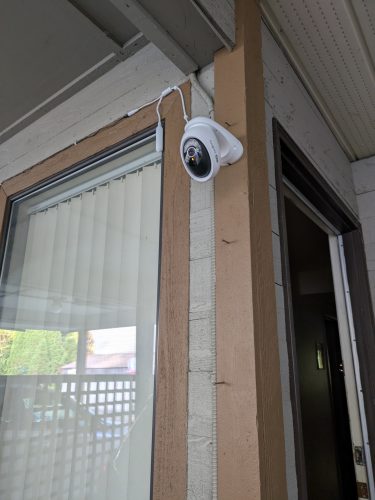 Yes, it is on the wall. I will post another update for the software, app, etc.