I wrote a post long time ago about how to use Gmail with phpBB 3. Now it is 2019. It may get error with the same settings. It is not because my guide is wrong. Actually Google add more security protection on its Gmail facility.
Let me review the settings.
1) Make sure your Gmail account (Google Apps account) is working properly.
Sample below:
Gmail account: myname@gmail.com
Gmail password: 123456
You can sign in your Gmail from the browser, Chrome or Firefox, etc.
2) Enable POP
Forwarding and POP / IMAP. Under POP Download, click either Enable POP for all Mail, or Enable POP for Mail that Arrives Now (which ever suits your purpose). Configure anything else that appeals to you too. Exit from the Gmail Settings Window after saving your selections (this is important).
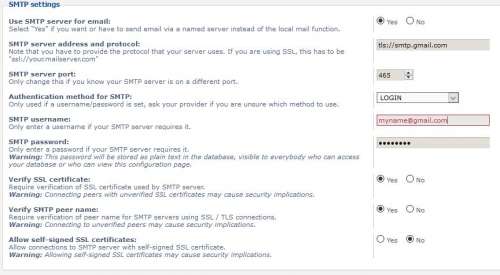
3) Settings in phpBB 3.2.x
Login the phpBB administrator panel.
Goto General Admin > Configuration > Email Settings
SMTP Server Address:tls://smtp.gmail.com
SMTP Ports: 465
Authentication method for SMTP: PLAIN
SMTP Username: myname@gmail.com
SMTP Password: 123456
After the above three steps, try to send email by forget password or register a new user.
Check the error log on the phpBB Admin panel.
There are may be erro 535 or error 534. The error looks like below:
Error 535
Email 错误
» EMAIL/SMTP
/forum/ucp.php

Ran into problems sending email at Line 1662. Response: 535 5.7.8 https://support.google.com/mail/?p=BadCredentials q128sm62190489pga.60 - gsmtp
.
Backtrace

Connecting to tls://smtp.gmail.com:465
LINE: 1205 <- 220 smtp.gmail.com ESMTP q128sm62190489pga.60 - gsmtp

# EHLO freesat.cn
LINE: 1552 <- 250-smtp.gmail.com at your service, [165.227.55.7]

LINE: 1552 <- 250-SIZE 35882577

LINE: 1552 <- 250-8BITMIME

LINE: 1552 <- 250-AUTH LOGIN PLAIN XOAUTH2 PLAIN-CLIENTTOKEN OAUTHBEARER XOAUTH

LINE: 1552 <- 250-ENHANCEDSTATUSCODES

LINE: 1552 <- 250-PIPELINING

LINE: 1552 <- 250-CHUNKING

LINE: 1552 <- 250 SMTPUTF8

# AUTH PLAIN
LINE: 1655 <- 334

# Omitting sensitive information
LINE: 1662 <- 535-5.7.8 Username and Password not accepted. Learn more at

LINE: 1662 <- 535 5.7.8 https://support.google.com/mail/?p=BadCredentials q128sm62190489pga.60 - gsmtp
Error 534
Email 错误
» EMAIL/SMTP
/forum/ucp.php

Ran into problems sending email at Line 1662. Response: 534 5.7.14 https://support.google.com/mail/answer/78754 c3sm70133058pfg.88 - gsmtp
.
Backtrace

Connecting to tls://smtp.gmail.com:465
LINE: 1205 <- 220 smtp.gmail.com ESMTP c3sm70133058pfg.88 - gsmtp

# EHLO freesat.cn
LINE: 1552 <- 250-smtp.gmail.com at your service, [165.227.55.7]

LINE: 1552 <- 250-SIZE 35882577

LINE: 1552 <- 250-8BITMIME

LINE: 1552 <- 250-AUTH LOGIN PLAIN XOAUTH2 PLAIN-CLIENTTOKEN OAUTHBEARER XOAUTH

LINE: 1552 <- 250-ENHANCEDSTATUSCODES

LINE: 1552 <- 250-PIPELINING

LINE: 1552 <- 250-CHUNKING

LINE: 1552 <- 250 SMTPUTF8

# AUTH PLAIN
LINE: 1655 <- 334

# Omitting sensitive information
LINE: 1662 <- 534-5.7.14 <https://accounts.google.com/signin/continue?sarp=1&scc=1&plt=AKgnsbvN

LINE: 1662 <- 534-5.7.14 oQL0Oh8c3yyrQ3pFWK8OSPe0ZeGUxF2IhoMTilIFwIhrm23Gh3AzeyJieBixBumfmLEUcK

LINE: 1662 <- 534-5.7.14 8uGA3j9f8ivM_fTF4QTY7IjShfbixidMFTu6snmNH9dGueiZpHaWPcVtrUFLGIQqhSVSl7

LINE: 1662 <- 534-5.7.14 wxVGeVOzTzQnsRZbpMRXhyL1L6dmZbpzwZhRrQPbmg_MzYMtjzW7UwBT> Please log

LINE: 1662 <- 534-5.7.14 in via your web browser and then try again.

LINE: 1662 <- 534-5.7.14 Learn more at

LINE: 1662 <- 534 5.7.14 https://support.google.com/mail/answer/78754 c3sm70133058pfg.88 - gsmtp
At this point, you should go to change the settings of your Gmail or Google account.
4) Settings at Google
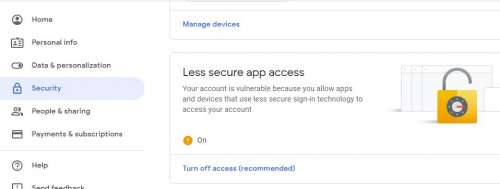
Enable less secure apps to access account
Sign in to your Google account
Click Security
On the bottom of the page, in the Less secure app access panel, click Turn on access.
Unlock Captcha
Sign in to your Google account
Open https://accounts.google.com/DisplayUnlockCaptcha link and click button to unlock Captcha
Now, the Gmail can handle the mailing from phpBB without errors.